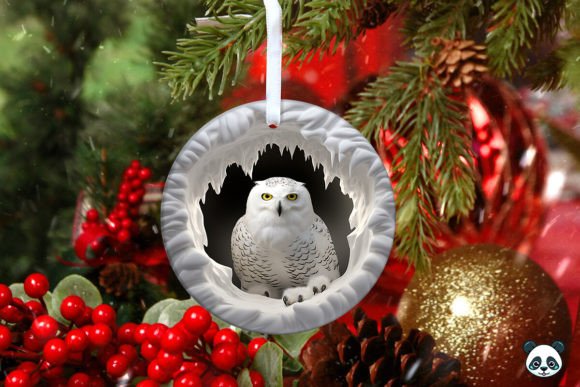
Integrating the 3D Snowy Owl Christmas Ornament into Your Sublimation Workflow
For creators and small business owners navigating the holiday rush, the difference between a chaotic production schedule and a streamlined operation often lies in the quality and compatibility of digital assets. The 3D Snowy Owl Christmas Ornament design represents more than just a festive image; it is a specialized component designed to fit precisely into the sublimation manufacturing process. When you incorporate a high-fidelity asset like this into your workflow, you are essentially outsourcing the most time-consuming part of product development: the structural design and pattern alignment.
This article explores how to effectively integrate this specific digital download into your existing creative and business processes, ensuring that the transition from file acquisition to finished physical product is as efficient as possible.
Pre-Production Planning and Asset Verification
Before any ink hits the paper, the integration of the 3D Snowy Owl Christmas Ornament begins with file management and verification. In a professional setting, assuming a file is "ready to print" without inspection is a common pitfall that leads to wasted materials and missed deadlines. Upon receiving the instant digital download, your first step should be a technical audit of the provided PNG file.
The asset typically arrives as a 5-inch by 5-inch file at 300 DPI. While these specifications are standard for high-quality sublimation, verifying them within your design software (such as Adobe Photoshop, Illustrator, or Affinity Designer) is crucial. You need to confirm that the resolution has not been interpolated down, which would result in pixelation when printed. The 3D background and the owl illustration itself rely on crisp edges to maintain the illusion of depth; a low-resolution print will flatten this effect, diminishing the perceived value of the final ornament.
Furthermore, understanding the color profile is essential. Sublimation printers often operate best in CMYK or specific ICC profiles tailored to your ink and paper combination. Since the downloaded file is likely in RGB, you must manage the color conversion process carefully. The watercolor textures inherent in the Snowy Owl Christmas watercolor style can shift significantly during conversion. A practical workflow involves creating a test print on standard paper before committing to expensive sublimation sheets. This allows you to adjust saturation and contrast to ensure the snowy whites remain bright and the owl's details do not get lost in the transfer process.
Design Integration and Template Alignment
Once the asset is verified, the next phase involves mapping the Ornament Wrap PNG to your specific hardware. Not all ornaments are created equal, even if they share the same nominal size. The 15 Oz Ornament Template mentioned in many product descriptions often refers to a specific shape—frequently a flat, two-sided disc or a slightly curved sphere—that requires precise alignment.
The 3D Ornament wrap design provided in the ZIP file is engineered to wrap around the curvature of the object. If you are using a standard skinny ornament or a classic round bauble, you must determine how the 5x5 inch square maps onto the surface. For flat ornaments, the process is straightforward: center the design and ensure the bleed area covers the edges to prevent white lines after pressing. However, for curved surfaces, you may need to distort or adjust the placement slightly to account for the stretching that occurs when the paper shrinks onto the substrate during heating.
Professionals often create a master template file where the Snowy Owl Christmas seamless pattern or the main 3D design is pre-positioned. This saves time when producing batches. By saving your workspace with the correct guides and safe zones, you eliminate the need to re-measure for every single unit. This is particularly important when dealing with the 3D Snowy Owl Christmas theme, where the positioning of the owl's face relative to the ornament's hanger hole can make or break the aesthetic balance. Ensuring the owl is centered and upright after the press requires foresight during the digital layout stage.
The Production Phase: Sublimation Execution
During the actual printing and pressing phase, the Sublimation Designs interact directly with your physical tools. The quality of the Ornament wrap sublimation outcome depends heavily on the synergy between the digital file and your heat press settings. Because the design features a 3D design aesthetic with shadows and highlights, consistent heat and pressure are vital. Uneven pressure can cause parts of the Snowy Owl Christmas png to appear faded, breaking the 3D illusion.
When wrapping the sublimation paper around the ornament, tension is key. The paper must be tight against the surface to prevent ghosting or blurring. Using high-temperature tape to secure the Ornament wrap template ensures that the image does not shift during the thermal transfer. For the Snowy Owl Christmas skinny Ornament variations, extra care must be taken at the seams. If the design includes a seamless pattern, the join line should be placed strategically—often at the back or bottom—to maintain visual continuity.
It is also worth noting that the 3D background elements in the design may react differently to heat than solid colors. Watercolor effects can sometimes spread if the temperature is too high or the dwell time is too long. adhering to the manufacturer's recommended time and temperature for your specific blank ornaments is non-negotiable. Keeping a log of your press settings for this specific 3D Ornament sublimation design helps in replicating success across large batches.
Quality Control and Post-Processing
After the cooling period, the evaluation of the 3D Ornament begins. Quality control in a sublimation workflow is not just about spotting defects; it is about ensuring consistency across the product line. When producing a collection based on the Snowy Owl Christmas theme, customers expect uniformity. Check for color vibrancy, sharpness of the owl's feathers, and the integrity of the seamless pattern if used.
Any ornament with visible paper lines, smudges, or misaligned wraps should be set aside for re-pressing or discarded. This step protects your brand reputation. Additionally, consider the finishing touches. Does the 3D Snowy Owl Christmas Ornament require a protective coating? While sublimation is durable, adding a layer of epoxy or a glossy sealant can enhance the 3D effect, making the watercolor textures pop and giving the product a premium feel. This decision should be made based on your target market and price point.
Scalability and Business Application
Integrating this digital asset into your business goes beyond making a single item. The Instant Digital Download PNG format allows for infinite scalability. Whether you are a hobbyist making gifts or an entrepreneur fulfilling hundreds of orders, the file serves as a repeatable resource. You can use the Snowy Owl Christmas wrap to create coordinated product lines—matching ornaments, coasters, or mugs—by extracting elements from the main design or utilizing the included seamless patterns.
From a marketing perspective, the 3D Snowy Owl Christmas theme taps into specific seasonal trends. Bird enthusiasts and lovers of winter wildlife are distinct niches. By having a high-quality, ready-to-use design, you can rapidly deploy marketing campaigns without waiting for custom illustrations. The efficiency gained here allows you to focus on customer service, packaging, and logistics rather than getting bogged down in the design phase.
Moreover, organizing your digital library effectively ensures long-term usability. Store the Ornament wrap sublimation files in a structured folder system, tagged with keywords like "Winter," "Birds," "3D," and "Holiday." This makes retrieval easy for future seasons. Remember, while the file is an instant download, its value compounds over time as you refine your production process around it.
Final Thoughts on Workflow Efficiency
The 3D Snowy Owl Christmas Ornament design is a tool that, when used correctly, bridges the gap between digital creativity and physical merchandise. It eliminates the need for complex vector tracing or manual pattern creation, allowing you to focus on the execution. By respecting the technical requirements of the file, aligning it properly with your templates, and maintaining rigorous quality control, you transform a simple PNG into a high-value product.
Success in sublimation is rarely about luck; it is about the meticulous management of variables. From the DPI of the Snowy Owl Christmas png to the temperature of your heat press, every step influences the final result. Embrace this asset as a core part of your holiday production pipeline, and you will find that your output becomes faster, more consistent, and professionally polished. As you move forward, continue to experiment with how this design interacts with different substrates and finishes, always keeping the end-user experience as your primary metric for success.